Most of the value of match analysis is lost in the last mile. The footage is filmed, the game is tagged, the numbers are ready, and then somebody has to turn all of it into ten minutes a squad will actually sit through. Presentations are the part of Framesports built for that last mile, and they are the feature coaches use most and discover last. Here is how they work.
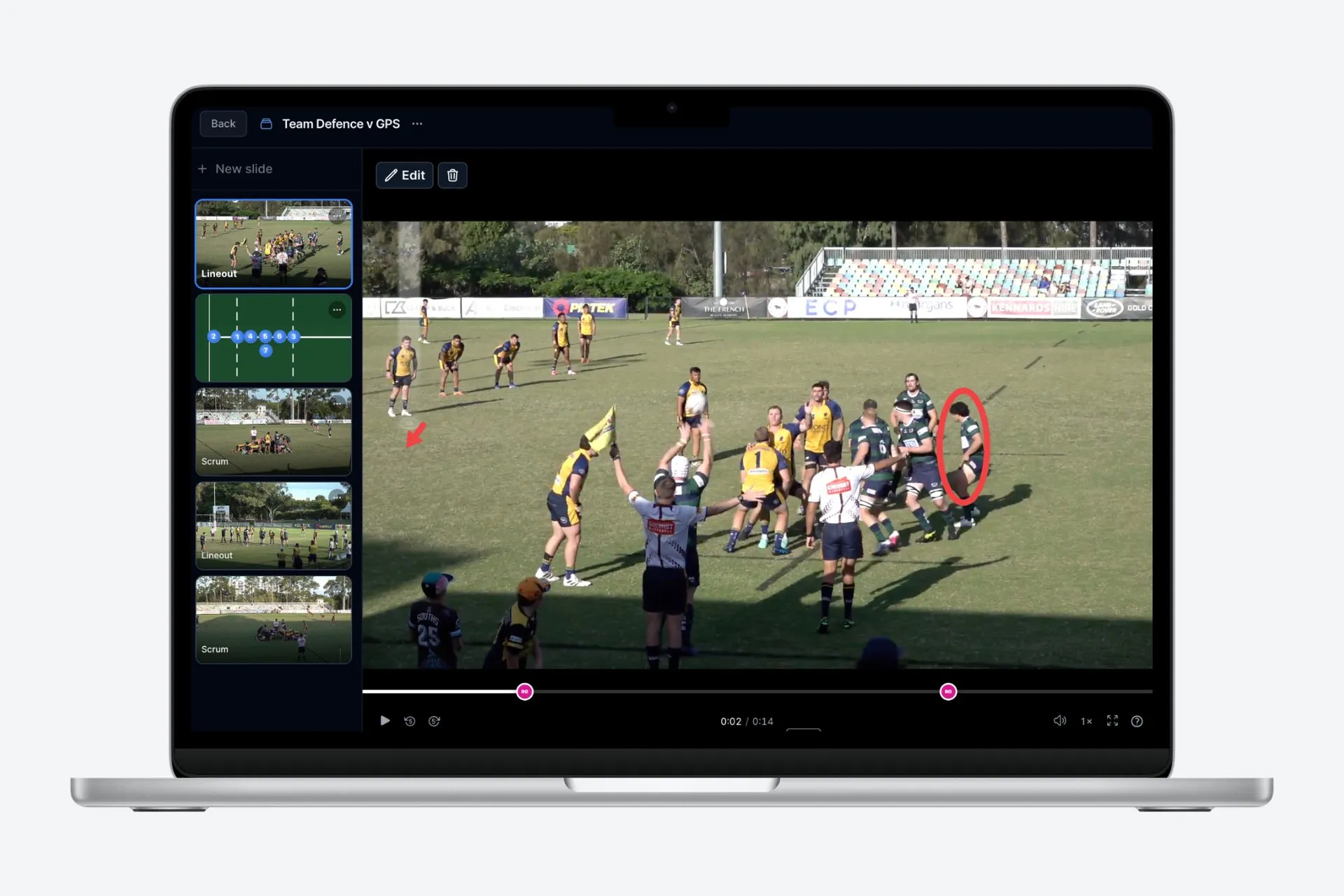
A presentation is a deck of slides, and the slides are the good part
A presentation is a sequence of slides you build and reorder, the same shape as any slide deck you have used. What is different is what a slide can be. There are five kinds.
Clips come straight out of the analysed match. Because every carry, tackle, breakdown, lineout and try is already recorded with its timestamp, you are choosing a moment rather than scrubbing for one. Clips are padded automatically so there is context before the event and a beat afterwards, and you can adjust either end. If a match has more than one camera angle, you choose which one the clip uses.
Stat slides are charts built from the same match data, not screenshots pasted in from somewhere else. Bar, line and pie charts, single big numbers, leaderboards and timelines, each filtered to the games, the team, the players and even the passage of the match you care about. When the underlying analysis is right, the chart is right.
Title cards are the connective tissue: a heading and a few lines to introduce a section, so a presentation reads as an argument rather than a pile of clips.
Animations let you move players around a pitch to show the shape you wanted instead of the shape you got. You place the actors, set keyframes, and the movement plays out.
File slides cover everything else you already have and do not want to rebuild.
Draw on the video, and let the drawing carry the message
Any clip can be paused and drawn on. You get a frozen frame and a set of shapes, so you can circle the space nobody saw, trace the line you wanted, and mark the drift that let the winger in. Each drawing carries a written note, and you can attach a voice note to it, which is the quiet killer feature: the tone that makes a hard point land is much easier to say than to type.
You can @mention players in a drawing or a comment, and the people you mention are notified. That turns a presentation from a broadcast into a conversation, and it is the difference between analysis players watch and analysis players reply to. Threaded comments on each slide and mention groups arrived in the March 2026 product update.
Record yourself presenting it once
The best video session is a live one, and the problem with a live one is that the three players who most needed it were not there. So you can record yourself presenting, voice and screen together, and the recording is stored with the presentation.
Recordings are transcribed automatically, and the transcript is mapped to the slides it belongs to, so anyone can find the bit where you talked about the lineout without watching from the start. Present once on Tuesday, and the player who was at work on Tuesday gets the same session on Wednesday night.
Share it deliberately
A presentation is shared explicitly rather than sitting in a folder. You can give access to a specific person, to a group you have set up, or to the whole account, and each of those is either view or edit. Coaches can build together, a player can be given exactly the analysis that concerns them, and a review that should not go to the whole squad does not.
If you would rather hand over a plain video, a presentation downloads as a single MP4 with the clips, title cards and drawings stitched together in order. That is the version you drop into a team chat.
What this is actually for
The temptation with a tool like this is to build the twenty-minute masterpiece. Resist it. Everything we have seen says short and regular beats long and occasional: a handful of clips, one honest chart, a clear ask, under fifteen minutes and ideally under five. The tool is not the point. The habit is the point, and the tool exists so the habit costs a coach twenty minutes on a Sunday instead of an evening.
That is also the part professional programmes get right and clubs usually cannot afford to: analysis that reaches players rather than living on a coach’s laptop. Doing it properly used to need staff. It is very affordable now, which is rather the point.
If you already have footage and have not built one, start with the last match, pick five clips, and send it to your squad tonight.
Hero photo: NaBUru38, CC BY-SA 4.0, via Wikimedia Commons.